

Find answers to the most frequently asked questions about data sources.Documentation Index
Fetch the complete documentation index at: https://docs.olly.new/llms.txt
Use this file to discover all available pages before exploring further.
How access control works on Olly? Is there special RBAC?
How access control works on Olly? Is there special RBAC?
Olly does not introduce a separate RBAC model.
Access in Olly is determined by the data source that is connected to it. When a data source is added (via API key or SSO), Olly operates according to the data scopes and permissions associated with that connection.
I just integrated Olly. How can I start asking it questions?
I just integrated Olly. How can I start asking it questions?
You must connect at least one data source for Olly to query. When a new Coralogix team is connected as a data source, Olly begins learning its data—this process can take up to 24 hours. Once complete, Olly’s accuracy improves dramatically.
Can I immediately start connecting data sources?
Can I immediately start connecting data sources?
AI capabilities must be enabled in Coralogix by the admin. To allow data source connection, enable the AI-Powered Capabilities toggle in Settings → Account Preferences.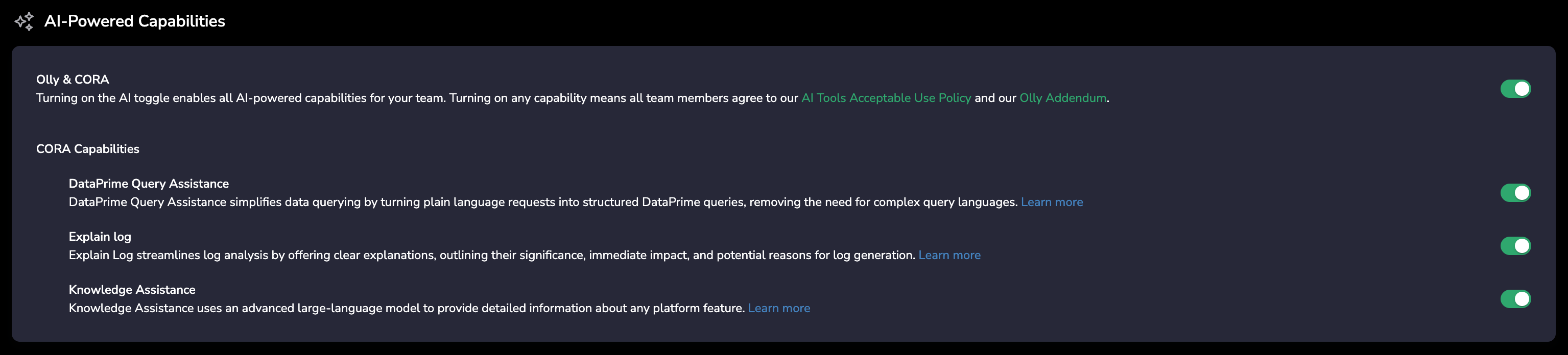
I just connected a data source. How can I start asking Olly questions?
I just connected a data source. How can I start asking Olly questions?
Yes. However, once integrated, Olly starts learning your observability workspace. This process can take up to 24 hours. Once finished, Olly’s accuracy gets improved dramatically.
How can I identify which Coralogix team is connected to a data source in Olly?
How can I identify which Coralogix team is connected to a data source in Olly?
If your organization has multiple Coralogix teams, identifying the correct one depends on how the data source was connected:
- Connected using an access token (Sign in with Coralogix → Coralogix tab): Olly displays the exact Coralogix team name, making it easy to identify the corresponding account.
- Connected manually using an API key: Olly currently does not display the Coralogix team name for API key–based connections. We’re aware this can be limiting and may improve this experience in a future update.