

The Members page allows organization admins to view and manage members, handle invitations and access requests, and control user roles within the organization.Documentation Index
Fetch the complete documentation index at: https://docs.olly.new/llms.txt
Use this file to discover all available pages before exploring further.
Invitations and requests
The Members view includes dedicated tabs for:- Invitations: Users who were invited but haven’t joined yet.
- Requests: Users requesting access to the organization.
View and manage members
From the Members list, admins can:- View all organization members.
- See pending invitations and join requests.
- Invite new members to the organization.
- Remove members from the organization.
Change member roles
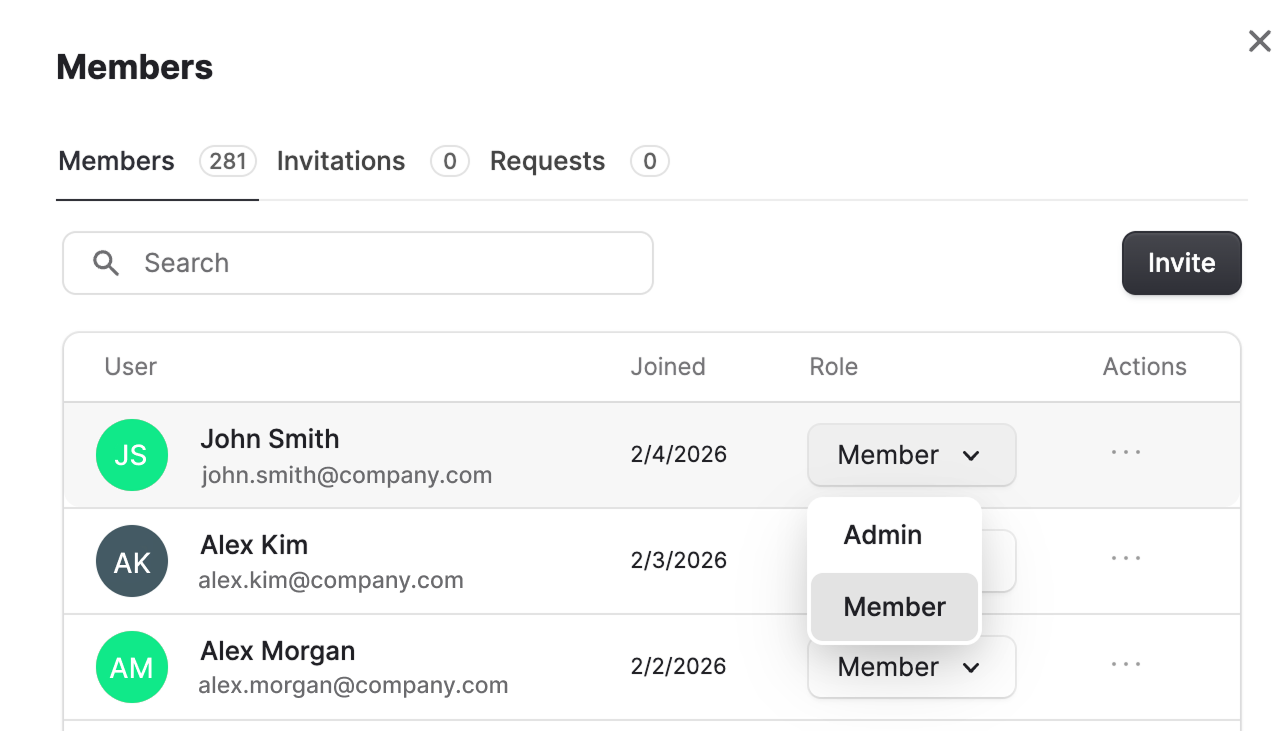
Admins can change user roles at any time:- Go to Organization → Members.
- Locate the member in the list.
- Update their role from Member to Admin (or vice versa).
Remove members
Admins can remove members from the organization at any time:- Go to Organization → Members.
- Locate the member in the list.
- Select Actions -> … -> Remove member.
- The user immediately loses access to the organization.
- Any assigned seat is released and becomes available for reassignment.
- The user can be re-invited later if needed.