

The Organization page covers general organization settings in Olly. From here, admins can manage organization details, control access through verified domains, and handle organization-level actions.Documentation Index
Fetch the complete documentation index at: https://docs.olly.new/llms.txt
Use this file to discover all available pages before exploring further.
Verified domains and access control
Admins can add verified email domains to control how users join the organization.Add a verified domain
- Go to Organization → General.
- Under Verified domains, select + Add domain.
- Enter the domain.
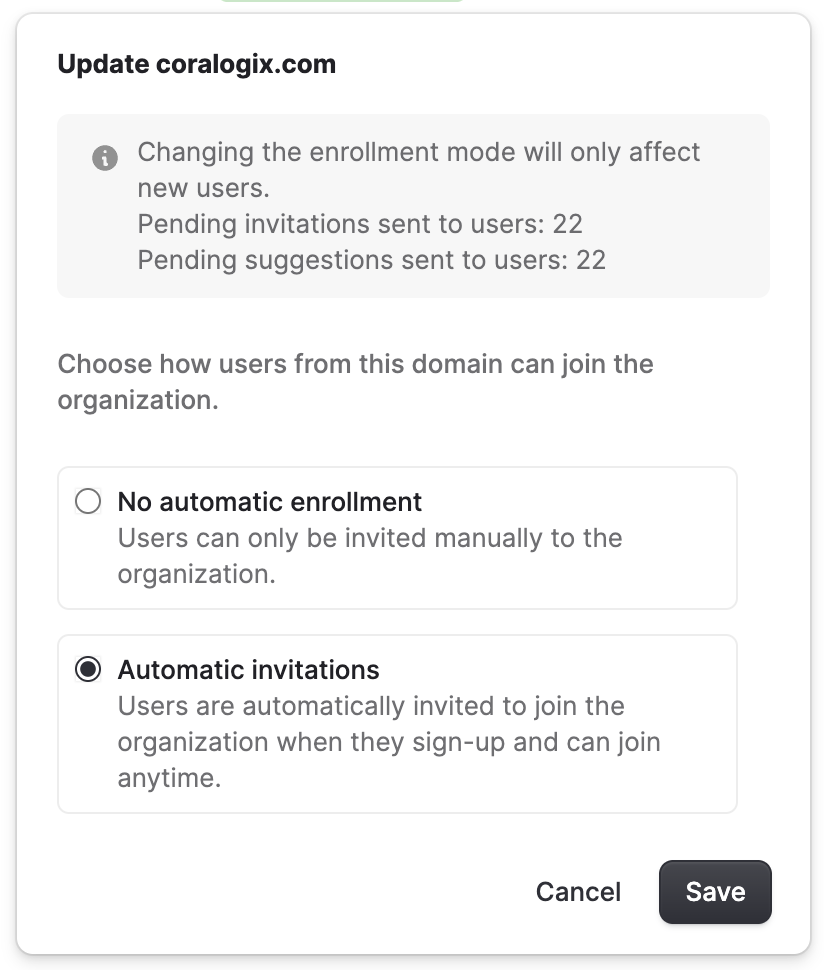
- Choose how users from this domain can join the organization. Olly supports two enrollment modes for verified domains:
- Automatic invitations:
- Any user with a matching email domain (for example,
@coralogix.com) can join automatically. - No manual admin approval is required.
- Any user with a matching email domain (for example,
- No automatic enrollment:
- The domain acts as a recommendation rather than automatic access.
- Users may request to join and require admin approval.
- Automatic invitations:
Leave or delete an organization
From Organization → General, users can also manage their relationship with the organization:- Leave organization: Allows a user to remove themselves from the organization.
- Delete organization: Permanently deletes the organization and all associated data.
This action is irreversible and available to admins only.